The short answer
MyBuilder has no joining or membership fee. You express interest in jobs for free, and you pay a shortlist fee only when a customer shares their contact details with you. The fee is shown before you act and is worked out from the likely size, value and location of the job. You pay it whether or not you win the work.
Companies in this guide
On this page
How MyBuilder charges
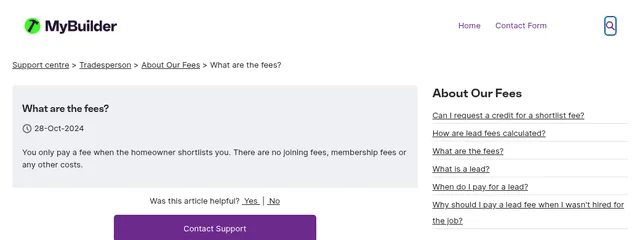
MyBuilder's fees page (opens in a new tab) is short: you only pay a fee when the homeowner shortlists you, and there are no joining fees, membership fees or other costs. Checked October 2026
A lead arrives
Jobs matched to your trade and work area.
FreeExpress interest
Send the customer an introduction message.
FreeYou're shortlisted
The customer shares their phone number and email with you.
You pay hereQuote the job
Win or lose, the fee for that shortlist is due.
Under MyBuilder's tradesperson terms (opens in a new tab) (updated 4 March 2026), the shortlist fee becomes payable when the customer's contact details are shared with you, and "it is not necessary for you to be awarded the Job for the Shortlist Fee to be payable". Fees are invoiced at least weekly and collected automatically from your card.
 (opens the page in a new tab)
How much the shortlist fee is
MyBuilder doesn't publish a price list. Its terms say each fee is calculated from the likely size, value and location of the job, and the fee (before VAT) is shown on each lead before you do anything that could share contact details. So you always see the price before you commit.
| Figure | Where it comes from | |
|---|---|---|
| How the fee is set | Likely size, value and location of the job | MyBuilder terms, clause 10.2 |
| When you see it | On each lead, before you act, excluding VAT | MyBuilder terms, clause 10.1 and 10.2 |
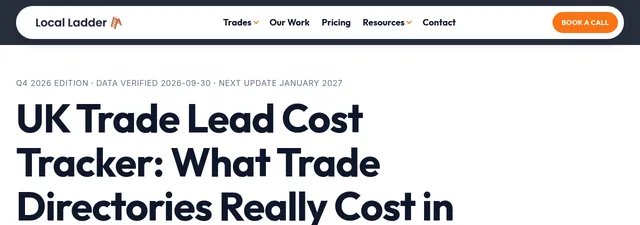
| Typical fees reported | From about £7, commonly up to around £35 | Local Ladder tracker, verified 30 September 2026 (independent, not MyBuilder) |
| Optional extra | A monthly fee for sponsored placement | MyBuilder terms, clause 6.2 |
 (opens the page in a new tab)
Rules that catch people out
From MyBuilder's tradesperson terms:
- No contact details before you're shortlisted. Your messages and profile mustn't include your contact details or links to other websites until the customer shortlists you.
- No working round the fee. Trying to swap contact details outside the platform, including sending a customer to your own website to avoid the fee, can get your account closed.
- No mentioning competing platforms in what you post.
- Overdue invoices can lead to suspension after 15 days, with statutory interest on late payments.
Refunds and account credit
MyBuilder's terms say shortlist fees are non-refundable, except where it decides to issue a refund under its policies, at its sole discretion. Any refund is given as account credit, not cash. Account credit can only be used against future shortlist fees and expires after 12 months unless MyBuilder gives another date.
Is it worth it?
Because there's no monthly fee, MyBuilder is a low-risk way to test whether a lead site works for your trade and area. The cost to watch is shortlist fees on jobs you don't win. Work it out over a month:
Work out your cost per job won
Example figures to start with. Put in your own from your invoices and records. Nothing is sent anywhere.
If your cost per job won is comfortably below the profit on a typical job, the platform is paying its way. If it isn't, change how you use it or stop.
Good for
- No joining or membership fee
- You see the fee before you commit
- No contract, so you can stop when you like
- You choose which jobs to go for
Watch out for
- You pay when shortlisted, not when you win
- No published price list
- Refunds are discretionary, and only as credit
- Strict rules on sharing your details and website
Getting more from it
Be choosy
Express interest only in jobs you can do well, in your area, at a size that can carry the fee.
Write a proper introduction
Customers decide who to shortlist from your message and profile. Be specific about the job and how you'd approach it.
Make your profile work
Good photos of finished work and genuine feedback help you get shortlisted.
Get in touch quickly
Once you're shortlisted, contact the customer straight away while the job is fresh in their mind.
Track your results
Log each fee and outcome, so you know your real cost per job won.
Comparing options? See Checkatrade vs MyBuilder vs Bark and is Bark worth it?
Questions and answers
Is MyBuilder free to join?
Yes. MyBuilder says there are no joining fees or membership fees. You pay only when a customer shortlists you.
How much is a MyBuilder lead?
MyBuilder doesn't publish a price list. Its terms say each shortlist fee is worked out from the likely size, value and location of the job and shown, before VAT, before you act. Independent trackers report fees from about £7, with typical jobs commonly up to around £35 (Local Ladder, 30 September 2026).
Do I pay MyBuilder if I don't get the job?
Yes. MyBuilder's terms say you don't need to be awarded the job for the shortlist fee to be payable.
Can I get a refund from MyBuilder?
Refunds are at MyBuilder's discretion and, under its terms, are given as account credit rather than cash. Account credit expires after 12 months unless another date is given.
How do I stop using MyBuilder?
There is no contract term. MyBuilder's terms say the agreement ends once you have paid all outstanding invoices and told them you no longer want to use the platform.
Sources
Every figure in this guide comes from the sources below, checked in October 2026. Prices and terms change, so check the company's own page before you sign up or cancel anything. This guide is general information, not financial, legal or tax advice.
- MyBuilder support: What are the fees? (opens in a new tab)
- MyBuilder support: What is shortlisting? (opens in a new tab)
- MyBuilder: Tradesperson terms and conditions (updated 4 March 2026) (opens in a new tab)
- Local Ladder: UK Trade Lead Cost Tracker (verified 30 September 2026) (opens in a new tab)
Toolbox Boost isn't connected to, paid by or endorsed by any company named in this guide. Logos and screenshots belong to their owners and are shown for identification and comparison. Spotted something out of date? Email admin@toolboxboost.com and we'll check it.